Pair Web Console โ†’
Zero-Typing Cloud Signage for Smart Stores & Enterprises

Turn Your Idle Smart TV Into
High-Impact Digital Signage.

No expensive hardware players or complex software contracts needed. Install the app on Android TV and pair with a 6-digit PIN. Connect your Google Drive in 1 second and update screens instantly from your smartphone.

Zero Hardware Costs
60-Second Zero-Typing Setup
Google Drive Live Sync
Zero-Downtime Offline Cache

Core Features

From Local Boutiques to Global Brands.
Everything Digital Signage Needs.

No steep learning curve. Effortlessly control every screen using the smartphone and Google Drive you already love.

Auto Time & Day Switch

Smart Auto Scheduler

Lunch Specials (11:30โ€“14:00) โ†” Dinner Specials (17:30โ€“22:00) โ†” Weekend Events. Menus switch automatically by day and timeโ€”effortless store automation!

์š”์ผ ๋ฐ ์‹œ๊ฐ„๋Œ€๋ณ„ ์ž๋™ ํŽธ์„ฑ ์Šค์ผ€์ค„๋Ÿฌ
Smart display ON/OFF timed to your business hours โ†’
Ultra-Fast Cloud Sync

Google Drive Live Sync

Just upload photos or videos from your phone to Google Drive. Your TV displays update instantly without having to log in to complex admin software.

๊ตฌ๊ธ€ ๋“œ๋ผ์ด๋ธŒ ์‹ค์‹œ๊ฐ„ ๋ผ์ด๋ธŒ ๋™๊ธฐํ™”
Sort by Filename or Custom Order โ†’
Pivot Stand Ready

4-Way Rotation & Screen Fit

Rotate seamlessly between horizontal displays (0ยฐ/180ยฐ) and vertical kiosks (90ยฐ/270ยฐ) with one click. Freely adjust screen fit: Crop (Fill), Fit, or Stretch.
์„ธ๋กœ ์Šคํƒ ๋“œ ๊ฑฐ์น˜๋Œ€ ๋””์ง€ํ„ธ ์‚ฌ์ด๋‹ˆ์ง€
Full Support for Vertical Stand Kiosks โ†’
Zero-Downtime Playback

Zero-Downtime Offline Cache

Never worry about store Wi-Fi hiccups or internet dropouts. Media is safely cached on local TV storage to ensure 24/7 continuous playback with zero black screen errors.

์ธํ„ฐ๋„ท ์žฅ์•  ์‹œ ๋กœ์ปฌ ์บ์‹œ ๋ฌด์ค‘๋‹จ ์žฌ์ƒ
Uninterrupted local playback even during network drops โ†’

Versatile Spaces

Wherever There Is a Screen,
SignPicks Is the Ultimate Solution.

From cozy neighborhood cafes to enterprise corporate headquarters, powering visual displays everywhere.
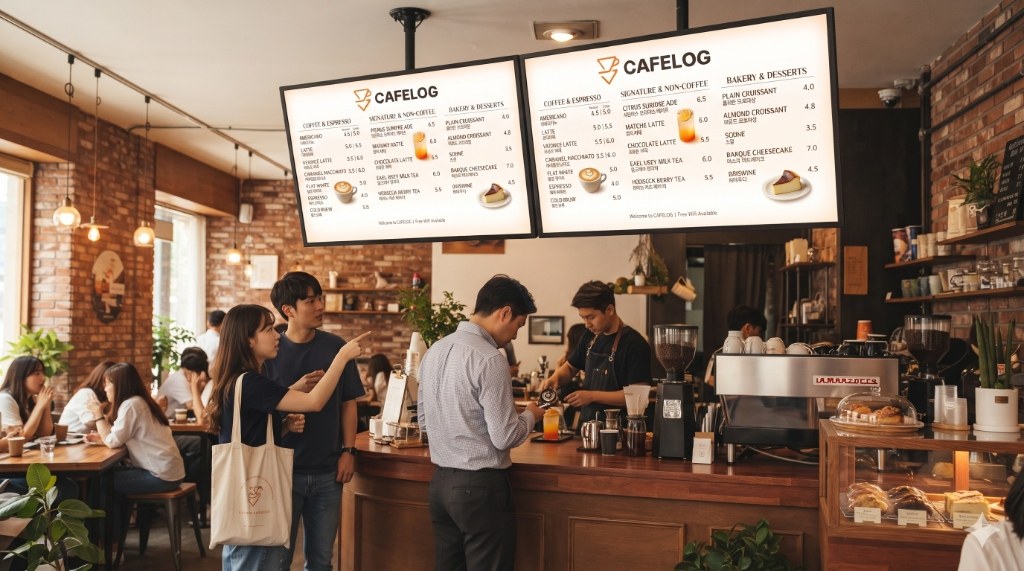
์นดํŽ˜ ์นด์šดํ„ฐ ๋“€์–ผ ๋””์ง€ํ„ธ ๋ฉ”๋‰ดํŒ
โ˜• Cafes & Dining

Cafe & Bakery Counters

Deploy dual digital menu boards above the counter to automatically switch between breakfast coffee sets, lunch specials, and evening desserts on schedule.
Dual TV Menu Board ยท Lunch/Dinner Auto-Switch
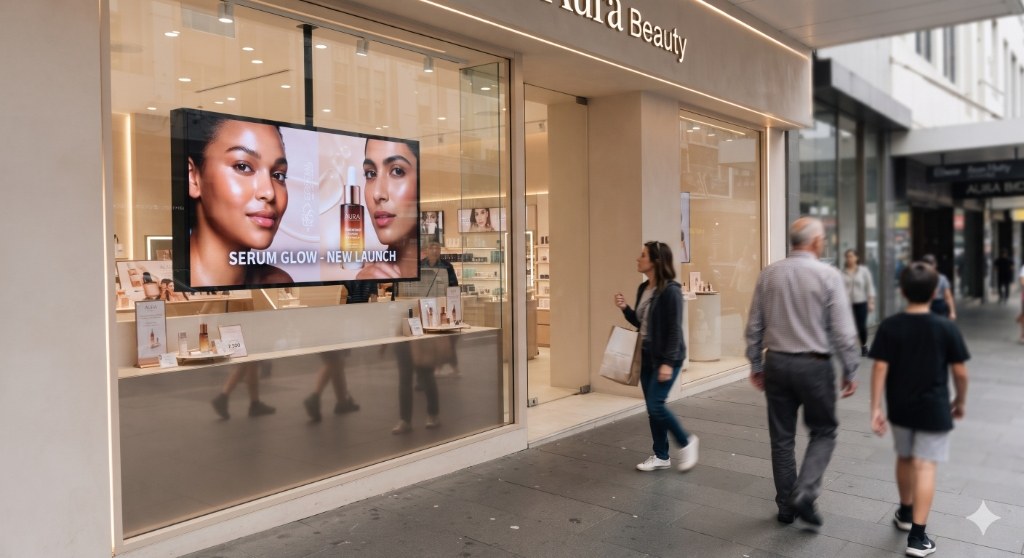
์‡ผ์œˆ๋„ ์ฒœ์žฅ ๊ฑฐ์น˜ ๋””์ง€ํ„ธ ์‚ฌ์ด๋‹ˆ์ง€
๐Ÿ›๏ธ Beauty & Showrooms

Street Show Window Displays

Suspend high-brightness displays inside street-facing show windows to showcase new arrivals and promotional lookbooks to passersby.

Show Windows ยท Visual Lookbooks ยท Product Promos
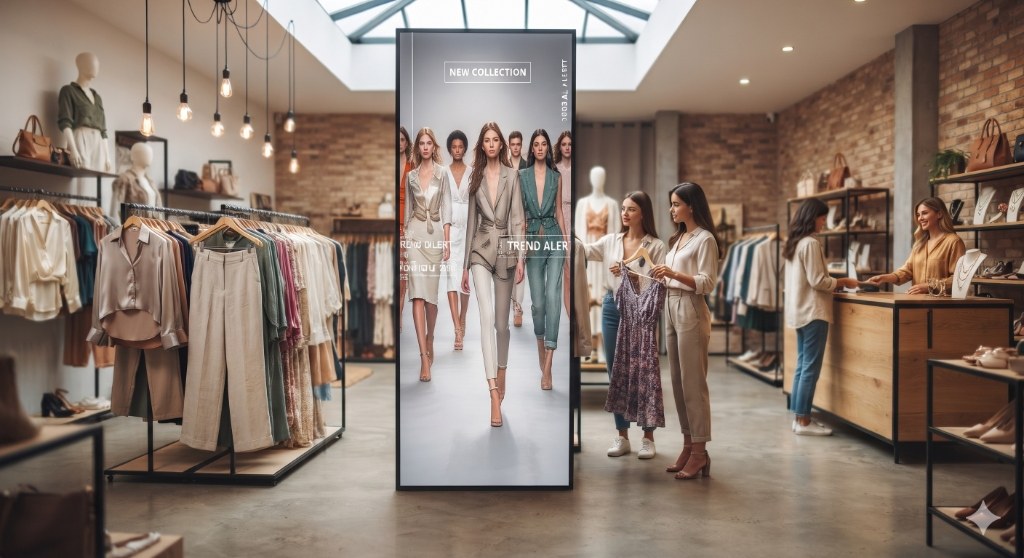
์˜๋ฅ˜ ๋งค์žฅ ์„ธ๋กœํ˜• ํ”ผ๋ฒ— ์Šคํƒ ๋“œ ํ‚ค์˜ค์Šคํฌ
๐Ÿ‘— Fashion & Boutiques

Vertical Pivot Stand Kiosks

Pair with vertical pivot stands to display full-length runway videos and style guides in immersive 9:16 vertical ratio.
Vertical Kiosks (9:16) ยท Runway Lookbooks ยท Sales
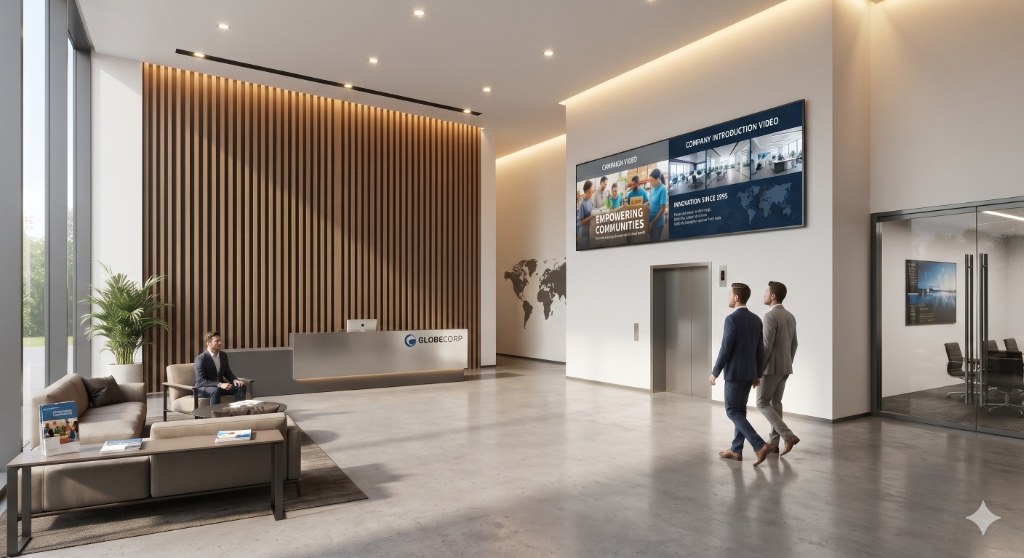
๊ธฐ์—… ๋ณธ์‚ฌ ๋กœ๋น„ ๋ฐ ์‚ฌ๋‚ด ๋ฐฉ์†ก TV
๐Ÿข Corporate HQ & Buildings

Corporate Lobbies & Broadcast

Install large displays in corporate lobbies and elevator banks to broadcast company announcements, visitor welcome messages, and floor directories in real time.

Internal Broadcast ยท Guest Welcome ยท Directory

Easy Setup

Zero-Typing Setup.
Up and Running in 60 Seconds.

No awkward typing with a TV remote. Just scan the QR code with your smartphone camera!

1

Install App on TV

Search for SignPicks on Google Play Store on your Google TV / Android TV or install via direct APK, then launch the app.

Google Play ์Šคํ† ์–ด SignPicks ์•ฑ ์„ค์น˜
6-Digit PIN & QR code automatically displayed on TV
2

Scan QR with Smartphone

Point your phone camera at the TV QR code, tap Sign in with Google on the mobile pairing page, and you are paired in 1 second!

์Šค๋งˆํŠธํฐ QR ์Šค์บ” ํŽ˜์–ด๋ง
๐Ÿ‘‰ Or enter PIN manually at signpicks.com/pair
3

Select Google Drive Folder & Play

Select any Google Drive folder containing your menus or promo graphics in the web console, and your TV immediately starts broadcasting.

๊ตฌ๊ธ€ ๋“œ๋ผ์ด๋ธŒ ํด๋” ์ง€์ • ๋ฐ ์‹ค์‹œ๊ฐ„ TV ์†ก์ถœ
Automatic cloud sync & schedule active

Transparent Pricing

First TV is Free Forever.
Scale As Your Business Grows.

No credit card needed. Start free in 60 seconds with your Google account.

Single Screen Free Forever

Free Starter

Basic lifetime free plan for cafes, single stores, and small offices (1 screen)

โ‚ฉ 0 / Free Forever (1 TV)
  • 1 TV display with unlimited playback (No watermarks)
  • Real-time Google Drive Auto Sync
  • Smart Calendar Auto Scheduler
  • 4-Way Rotation (0ยฐ/90ยฐ/180ยฐ/270ยฐ) & Fit
  • Zero-Downtime Offline Local Cache
Start 1 Screen Free โ†’
Recommended
Multi-Store & Extra Screens

Pro Store

For multi-display stores, kitchen screens, and growing businesses

โ‚ฉ 9,900 / Screen ยท Month (from 2nd TV)
  • Includes everything in Free Starter
  • Unified Web Console Remote Control
  • Master Screen Clone Mode Sync
  • Ultra-Fast Realtime WebSocket Remote Screen & Power Control
  • Priority Support & Remote Health Monitoring
Add More Screens in Web Console โ†’

FAQ

Frequently Asked Questions

Q. Can I use our existing TV or regular monitor? โ†“

Yes! Any smart TV with built-in Google TV or Android TV OS (TCL, Xiaomi, Hisense, Sony, Philips, etc.) can run SignPicks immediately. For regular monitors or older TVs without Google TV, simply plug a Chromecast with Google TV (HD/4K) or Android TV stick (around $25~$35) into an HDMI port.

Q. What happens if our store Wi-Fi or internet connection drops? โ†“

Your playback never stops! The SignPicks app pre-caches all images and videos into local TV storage. Even during complete network outages, your displays continue 24/7 uninterrupted playback without black screens.

Q. Can I mount the display vertically on a pivot stand? โ†“

Absolutely. With a single click in the web console, you can rotate the screen 90ยฐ or 270ยฐ to match vertical kiosks. Crop (Fill) mode ensures full-bleed, edge-to-edge vertical presentation without black bars.

Q. Can I mix photos (JPG/PNG) and videos (MP4) in the same playlist? โ†“

Yes! Just place your images and videos in the same Google Drive folder. Images play for your chosen duration (default 10s), while videos play through to completion before seamlessly advancing to the next item.

Q. Do I have to turn the TV on and off manually each day? โ†“

No! Set up SignPicks Smart Scheduler once, and your TV screen turns on automatically when your store opens and powers down into sleep mode when you close, enabling completely autonomous operations.

Q. Why does the TV turn off or enter standby after a few hours of operation? โ†“

The SignPicks app comes with Keep Screen On technology enabled by default to prevent sleep mode 24/7.
However, if the TV monitor's built-in Hardware Energy Saving / Auto-Off Timer (which turns the TV off after 4 hours of remote inactivity) is active, the TV hardware may shut itself down.

Simply open your TV remote's [Settings] menu once and set the manufacturer's energy saving timer to 'Off / Disabled' for reliable 365-day non-stop playback.

๐Ÿ“บ Google TV / Android TV TCL ยท Xiaomi ยท Hisense etc.
  1. On TV Remote, go to [Settings (โš™๏ธ)] โž” [System]
  2. Select [Power & Energy] โž” [Energy Saver]
  3. Change [Auto Power Off / Sleep Timer] to 'Never / Off'
  4. Set [Screen Saver] wait time to 'Off' as well
๐Ÿ“บ Samsung Smart TV (with Chromecast) Samsung Tizen
  1. On Samsung Remote, go to [Settings] โž” [General & Privacy]
  2. Select [Power and Energy Saving]
  3. Change [Auto Power Saving / Sleep Mode] to 'Off'
  4. Disable [Ambient Light Detection] for constant brightness
๐Ÿ“บ LG Smart TV (with Chromecast) LG webOS
  1. On LG Remote, go to [Settings (โš™๏ธ)] โž” [All Settings]
  2. Select [General] โž” [Energy Saving]
  3. Change [Auto Power Off after 4 Hours] to 'Off'
  4. Check [Timers] to ensure no sleep timers are set
๐Ÿ“บ Standard Monitors & Other Brands Prism ยท ViewSonic ยท Dell etc.
  1. On Monitor/TV Remote, go to [Menu/Settings] โž” [Timer]
  2. Change [Auto Sleep / Power Off Timer] to 'Off'
  3. Set [Auto Power Off on No Signal] to 'Off'
๐Ÿ’ก
Tip: Auto Schedule Store Hours & Overnight Sleep
If you want the TV display to automatically turn off at closing time and power back on when your store opens, configure the [Auto Scheduler] in the SignPicks Web Console for completely autonomous remote power control.

Transform Your Blank TV Screens Into
High-Impact Digital Signage.

Sign in with Google in 1 second. Pair your TV with a 6-digit PIN. Your first TV is 100% free forever.